

- Earning Loyalty Points: Automatically calculate and assign loyalty points based on a customer’s order. Points can be awarded for the total order value, factoring in product prices, discounts, taxes, and shipping fees. This helps customers accumulate points with every purchase, promoting engagement and retention.
- Previewing Points Before Completing an Order: Allow customers to view how many points they will earn based on the items in their cart before they proceed with checkout. This feature gives customers visibility into their rewards and can help drive purchases by highlighting loyalty benefits upfront.
- Redeeming Loyalty Points During Checkout: Customers can redeem their loyalty points at checkout to reduce the total amount of their order. The system calculates the value of the redeemed points, applies the corresponding discount, and ensures the redemption complies with the configured rules for point usage.
- Using Coupons in the Order: Customers can apply coupon codes during checkout to unlock specific discounts or benefits. The system validates the coupon, checks its eligibility criteria, and adjusts the order’s total price accordingly.
Placing an Order on Your E-Commerce Website
Let’s explore how the Orders API works, starting with what your customers experience and how their actions on your e-commerce platform interact with Gameball to trigger rewards and campaigns.1️⃣ Customer Journey on Your Website
Imagine this scenario:- Step 1: A customer, Sarah, visits your e-commerce website and adds items to her cart.
- Step 2: At checkout, she places an order for a pair of sneakers worth $500.
- Step 3: Sarah pays successfully, and her order is confirmed.
What Happens Next?
The moment Sarah’s order is completed, your website communicates with Gameball through the Orders API. This triggers a
The moment Sarah’s order is completed, your website communicates with Gameball through the Orders API. This triggers a
place_order event in the background, sending details like:- Order value
- Products purchased
- Customer information
- Complete Order Request Body
2️⃣ What Happens in Gameball?
Once theplace_order event is triggered:
-
Step 1: The Orders API automatically sends the order details to Gameball with the below mapping for the order event metadata.
Order API attribute Mapped to Event Object attribute totalPaid total_paid totalDiscount total_discount lineItems[i].weight weight lineItems[i].vendor vendor lineItems[i].sku sku lineItems[i].title title lineItems[i].tag tag lineItems[i].category category lineItems[i].collection collection extra.key[0]:value key[0]:value - Step 2: Gameball evaluates the order metadata based on your configured campaigns.
- Step 3: Sarah might earn rewards, such as cashback or loyalty points, based on your Gameball settings.
- If you’ve configured a rewards campaign for customers placing their first order, Sarah earns a $20 amount-based coupon as a reward for completing her first order on your website.

3️⃣ Seamless Automation for You
The Orders API eliminates extra work by:- Automatically triggering rewards based on Sarah’s purchase (no need for manual event creation).
- Connecting the order to multiple Gameball modules, such as cashback or campaign tracking.
- If Sarah qualifies for cashback, Gameball calculates the amount and updates her balance instantly and you can display it using the Get Customer Balance API.

This image showcases the Gameball widget displaying the customer’s balance. You can also retrieve the same information programmatically using the Get Customer Balance API for seamless integration with your application.
- If you’re sending order-based notifications, Sarah might receive a message like: “Congratulations, Sarah! You’ve earned 100 points for your last order.”

4️⃣ How This Looks to Sarah
Sarah’s experience remains smooth and rewarding:- She places an order without any extra steps.
- She receives instant confirmation about her reward points or cashback, enhancing her satisfaction.
- Over time, Sarah can redeem these points for discounts, keeping her engaged and loyal to your brand.
Why It Matters
By integrating the Orders API:- You provide a seamless customer experience while keeping them engaged with rewards.
- You streamline internal processes, saving time with automatic data mapping and event creation.
- You gain the flexibility to tie specific orders or products to targeted campaigns, driving sales effectively.
Previewing Points Before Placing an Order
Imagine a customer about to make a purchase, and you want to show them the exact points they’ll earn before completing the order. This helps enhance transparency and incentivize purchases by showing the rewards tied to their potential transaction.1️⃣ Customer Journey
Let’s see how this works:- A customer is viewing a product on your website during a “Triple Points Campaign”.
- The campaign is live from November 20 to November 30.
2️⃣ What Happens Next?
The moment the customer views this product: This request calculates potential rewards for the products you sent, accounting for:- Campaign-specific rewards (e.g., triple points).
- Customer tier-based rules (enhanced points for higher tiers).
The response provides:
- Total points for the order
- Points breakdown for each item
3️⃣ Example API Interaction
Here’s how the API request would look:4️⃣ How This Looks to the Customer
- The customer sees a live preview of the points they will earn, like this: “Complete your purchase now to earn 1497 points!”
- You can show the customer more information about the campaign and its impact using the response of the calculate cashback request as:
- Breakdown of the Total Points Earned: 1,497 Points
- Base Points: 499 Points (calculated from the base cashback rate)
- Extra Campaign Points: 998 Points (earned through the Triple Points Campaign)
- Campaign Details:
- Campaign End Date: November 29, 2024 (when the Triple Points Campaign ends)
- Breakdown of the Total Points Earned: 1,497 Points

Why This Matters
By integrating the Calculate Cashback API:- You enhance customer confidence and motivation to complete the order.
- You increase engagement by showing the value of active campaigns.
- You create urgency to act before the campaign ends.
Redeeming Points During an Order
Imagine a customer excited to redeem their hard-earned points while placing an order, but still wanting the freedom to browse and add more items to their cart before checking out. With Gameball’s redemption process, you can make this experience smooth and hassle-free by temporarily holding their points.1️⃣ Customer Journey
Let’s explore how this works: Sarah has earned loyalty points and is now ready to redeem them for a discount on her order. She has 50 points and wants to redeem them for her current cart.- Sarah selects the option to redeem 50 points during checkout.
- The system then reserves the points for her transaction, allowing her to continue shopping without losing them.
- Sarah finishes browsing and proceeds to complete her order.
2️⃣ What Happens Next?
The moment Sarah opts to redeem her points, the Hold Points API is triggered in the background. This request will:- Reserve 50 points from Sarah’s balance, ensuring they are locked for the order.
- Generate a hold reference ID, which is used to track the redemption.
- Allow Sarah to continue shopping freely without worrying that her points will be lost.
3️⃣ Example API Interaction
Here’s an example of how the API request for holding points would look:4️⃣ Linking Held Points to the Order
Once Sarah completes her order, the Hold Points API response provides a hold reference ID. This reference ID is then used to link the held points to the order during the checkout process.5️⃣ Order Response with Redeemed Points
After the order is processed, Sarah receives confirmation that her 50 points have been redeemed. The response will look like this:6️⃣ How This Looks to the Customer
- Points Reserved: Sarah sees that her 50 points have been securely held for her order.
- Seamless Checkout: As she proceeds with checkout, the points are automatically applied, reducing the total paid amount.
- Flexible Shopping: Sarah continues to browse and add items to her cart without losing the points she’s already reserved.
Why This Matters
- Convenience for Customers: Sarah is able to redeem her points without rushing through the checkout process, improving her shopping experience.
- Secure Redemption: The points are securely held, and she doesn’t have to worry about losing them if she continues shopping.
- Flexibility: The redemption can be applied seamlessly when she is ready to check out, making it hassle-free.
Using Coupon Codes During Checkout
Using coupon codes during checkout is an effective way to enhance the customer experience and boost sales. By validating and locking a coupon code, businesses can ensure that the discount is reserved exclusively for the customer, eliminating any risk of overuse or misuse. This approach provides a seamless checkout process, where the customer enjoys a personalized discount while the business maintains full control over coupon usage. This feature is particularly valuable during high-demand campaigns or limited-time promotions, as locking the coupon creates urgency and encourages faster purchasing decisions. By tying the locked coupon to the order, businesses can guarantee accurate tracking of discounts applied and maximize the impact of their promotional efforts.1️⃣ Customer Journey
Let’s see how this works:- Sarah is browsing your website and has a coupon code, offering her 10% off.
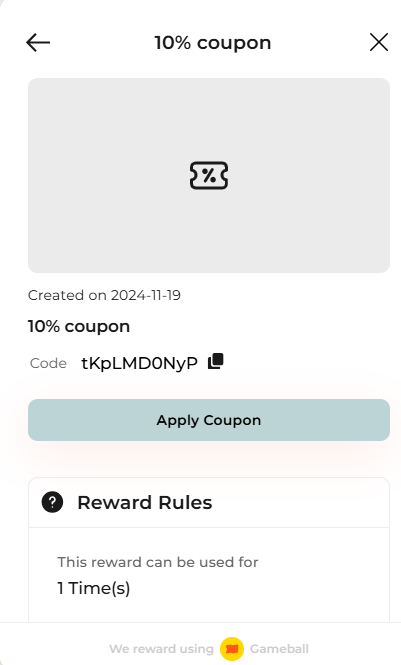
- She decides to use the coupon and proceeds to checkout, where she enters her coupon code.

- The system validates and locks the coupon for her exclusive use.
2️⃣ What Happens Next?
The moment Sarah enters her coupon codes, the Validate Coupon API is triggered in the background with the lock flag set totrue.
This request:
- Validates the coupon codes provided by Sarah.
- Locks the coupon for her use, ensuring it cannot be used by anyone else during the session.
- Returns a lock reference to track the coupon during the checkout process.
3️⃣ Example API Interaction
Here’s an example of how the API request to validate and lock the coupons would look:4️⃣ Coupon Lock Response
After the request is processed, the system responds with the following details:5️⃣ Linking the Locked Coupon to the Order
When Sarah is ready to finalize her purchase, the lockReference returned in the Validate Coupon Response will be included in the order API request to apply the coupon to her final order.6️⃣ How This Looks to the Customer
- Coupon Reserved: Sarah is assured that her 10% Discount is locked exclusively for her session.

- Personalized Discount: As she completes her checkout, the discounts are automatically applied, providing her with a seamless and rewarding experience.
- Urgency to Checkout: The locked coupons create urgency, encouraging Sarah to finalize her purchase before the lock expires.
Why This Matters
- Enhanced Customer Experience: Sarah enjoys a smooth and secure checkout process with her discounts applied seamlessly.
- Eliminating Risk of Misuse: The locked coupon ensures that Sarah’s discounts are reserved for her exclusive use, preventing misuse by others.
- Increased Conversion Rates: The coupon lock creates urgency, encouraging faster purchasing decisions and boosting sales.